Has your once powerful steam cleaner started to sputter, lose steam, or simply not clean as effectively as it used to? A high-quality steam cleaner is an invaluable asset for chemical-free, deep cleaning, tackling everything from stubborn grime to sanitizing surfaces around your home. However, like any hardworking appliance, it demands regular care to maintain peak performance and extend its lifespan. Without proper maintenance, mineral buildup and neglect can quickly diminish its efficiency and even lead to costly repairs. This comprehensive guide provides you with all the essential tips and tricks to keep your steam cleaner running smoothly, ensuring it remains your reliable partner in achieving a sparkling, hygienic home for years to come.
What is a Steam Cleaner and Why Maintain It?
A steam cleaner utilizes superheated water to generate a powerful jet of steam, effectively lifting dirt, grease, and grime without the need for harsh chemicals. This ingenious method not only cleans but also sanitizes, killing up to 99.9% of bacteria, viruses, mold, and dust mites. [cite: 1 (benefits), 2 (benefits)] From sealed hard floors and tile grout to upholstery and kitchen counters, the versatility of a steam cleaner makes it an eco-friendly and highly efficient cleaning solution. [cite: 2 (benefits), 4 (benefits)]
Investing in a steam cleaner is a commitment to a cleaner, healthier living environment, but its benefits are maximized only through consistent care. Regular maintenance is not merely about preventing breakdowns; it’s about preserving the machine’s cleaning efficacy, ensuring optimal steam production, and protecting your investment from premature wear and tear. A neglected steam cleaner can suffer from reduced steam pressure, clogged nozzles, and internal damage due to mineral deposits, undermining its core purpose. Therefore, proactive maintenance is crucial for sustaining both your machine’s performance and your cleaning results.
Daily and After-Use Care for Your Steam Cleaner
Adopting a few simple habits immediately after each cleaning session can significantly impact your steam cleaner’s longevity and efficiency. These routine steps prevent common issues from developing and keep your machine ready for its next task.
First and foremost, always empty and rinse the water tank thoroughly after every use. Leaving stagnant water inside can lead to mineral deposits, even with distilled water, and can encourage mold or bacterial growth, which might then be sprayed onto your surfaces. [cite: 2, 5 (water type)] Rinse the tank with fresh water to remove any residue and allow it to air dry completely before sealing and storing.
Next, clean all attachments, brushes, and mop heads. These components are directly exposed to dirt and grime, and if left uncleaned, can become breeding grounds for bacteria or cause blockages. Remove them from the unit, rinse them under warm water, and use a soft brush to gently scrub away any stubborn debris. For mop pads, wash them in hot water without fabric softener and allow them to air dry to maintain their absorbency and avoid chemical residue transfer.
Finally, wipe down the exterior of your steam cleaner with a damp cloth. This simple step removes dust, grime, and any water spots, keeping your machine looking new and preventing dirt from potentially affecting internal components. Always ensure the unit has cooled down completely before performing any cleaning or maintenance to avoid burns and damage.
Periodic Deep Maintenance: Descaling and Component Checks
While daily care addresses immediate needs, periodic deep maintenance is vital for combating the invisible enemy within: mineral buildup, also known as limescale. This is especially true for the boiler and internal components.
Descaling the Boiler
|
Our Picks for the Best Steam Cleaner in 2026
As an Amazon Associate I earn from qualifying purchases.
|
||
| Num | Product | Action |
|---|---|---|
| 1 | Steam Cleaner, Steam Cleaner For Home, Handheld Steamer For Cleaning With 21 Accessories, 248 °F High Temperature, Suitable for Grout, Floor. Sofas, Upholstery, White |

|
| 2 | Steam Cleaner, Powerful Multi-Purpose Portable Steam Cleaner, Removes Dirt and Grease, Suitable for Multiple Uses and Various Floor Surfaces, Includes 23-Piece Accessory Kit, 16.4-Foot Power Cord |
|
| 3 | LABIGO 10-in-1 Steam Mop with Detachable Handheld Steamer, 350ml Tank, 10s Heat-Up, 248°F Steam Cleaner, 3-Level Control and Swivel Head for Floors, Carpets, Tiles, BBQ grill Multi-Surface Clean White |
|
| 4 | Amazon Basics Multipurpose Steam Cleaner for Home with 22 Accessories, Chemical-Free Cleaning, 51oz tank, 1500W, White |
|
| 5 | Wagner Spraytech C900054 905e AutoRight Multi-Purpose Steam Cleaner, 12 Accessories Included, Power Steamer for cleaning, Color May Vary |
|
| 6 | Heavy Duty Steam Cleaner, 1500W High-Temperature Mop with 26 Accessories, 1.4L Portable Tank, Chemical-Free Cleaning for Floors, Tiles, Cars & More, Child Lock for Safety, Easy Operation |
|
| 7 | McCulloch MC1385 Deluxe Canister Steam Cleaner, 2-Hour Runtime, Chemical-Free, 23 Accessories: Mop Head, Brushes & More - Built for Home, Tile, Carpet, Furniture, & Personal Car Detailing |
|
| 8 | TVD Steam Cleaner, Steamer for Cleaning with 26 Accessories, Steam Cleaner for Home with 5M Extra-Long Power Cord for Home Floor Cleaning, Tile Detailing, Grout, Upholstery. |
|
| 9 | Steam Cleaner, Portable Steamer for Cleaning with 16pcs Accessories, 6-Level Adjustable, 15s Heat-Up, Handheld Steam Cleaner for Home for Tile, Grease, Dirt, Grout, Car Detailing, Green |
|
| 10 | Heavy-Duty Steam Cleaner - 1500W Multipurpose Handheld Floor Steamer with 22 Accessories 16ft Cord for Home, Car Detailing, Tile, Grout, Carpet, Wallpaper, Upholstery, Window, Deep Cleaning |
|
Mineral deposits from tap water, even when using filtered water, can accumulate inside the boiler and pipes, reducing heating efficiency, hindering steam production, and potentially causing permanent damage. [cite: 1, 2, 3, 1 (water type), 2 (water type), 4 (water type)] The frequency of descaling depends largely on the hardness of your local water and how often you use your steam cleaner. Generally, a monthly descaling is recommended for regular users, or more frequently in hard water areas. [cite: 2 (descaling), 5 (descaling)]
Here’s a common method for descaling:
- Prepare the solution: You can use a manufacturer-recommended descaling solution or a homemade mixture. A popular natural option is a solution of equal parts distilled white vinegar and distilled water. Alternatively, some recommend mixing 1.5 ounces of baking soda with one quart of clean water. [cite: 2 (descaling), 3 (descaling), 5 (descaling)]
- Fill the tank: Ensure the steam cleaner is unplugged and completely cool. Empty any remaining water from the tank, then fill it with your descaling solution according to the manufacturer’s instructions, usually to the maximum fill line.
- Heat and soak: Turn on the steam cleaner and allow it to heat up. Once hot, let the unit sit and keep warm for 30 minutes to 2 hours, depending on the severity of buildup. For heavier scale, some suggest a longer soak, even overnight. [cite: 1 (descaling), 2 (descaling), 5 (descaling)]
- Flush the system: After soaking, run the steam cleaner for about a minute, directing the nozzle into a sink or bucket to allow the solution to pass through the system. [cite: 1 (descaling), 5 (descaling)]
- Cool and drain: Unplug the machine and allow it to cool down completely (3-4 hours). [cite: 1 (descaling), 2 (descaling)] Once cool, remove the drain plug and empty the descaling solution.
- Rinse thoroughly: Fill the tank with fresh distilled water and flush the system several times to remove all traces of the descaling solution and any loosened mineral deposits. Continue rinsing until the water runs clear and any vinegar odor dissipates. [cite: 1 (descaling), 2 (descaling), 3 (descaling)]
> “Regular descaling is the single most important step to ensure your steam cleaner continues to deliver consistent, powerful steam. It’s like giving your appliance a new lease on life.” – Admin, ReviewCinch.com, Steam Cleaner Expert
Water Type Considerations
The type of water you use directly impacts the frequency and necessity of descaling.
- Distilled or Demineralized Water: These are generally recommended as the best options for steam cleaners because they contain minimal minerals, virtually eliminating limescale buildup and prolonging the machine’s life. [cite: 1, 2, 4, 1 (water type), 2 (water type), 4 (water type)] Using distilled water can save time on cleaning and maximize steam-cleaning power by preventing clogs. [cite: 2 (water type)]
- Tap Water: While many modern steam cleaners can tolerate tap water, especially in soft water areas, it’s not ideal. Tap water contains minerals like calcium and magnesium, which are the primary cause of limescale. If you must use tap water, be prepared for more frequent descaling. [cite: 1 (water type), 3 (water type), 4 (water type)]
- Softened Water: Avoid using water treated with a softener. Water softeners often replace calcium and magnesium with sodium, and increased sodium levels can be corrosive to the boiler and shorten the steam cleaner’s life.
- A Note on Acidity: One source suggests that distilled water, being pure, can become mildly acidic by absorbing carbon dioxide, potentially corroding metal boilers over time, and recommends good quality tap water or “drinking water” instead, or mixing distilled with tap water. [cite: 5 (water type)] Given these varying recommendations, it’s always best to consult your steam cleaner’s specific manufacturer guidelines regarding the recommended water type.
Inspecting Hoses, Nozzles, and Filters
Beyond the boiler, other components require periodic attention.
- Hoses: Regularly check hoses for any signs of cracks, kinks, or leaks. Damaged hoses can reduce steam pressure and create safety hazards. Replace any compromised hoses promptly.
- Nozzles and Steam Vents: Mineral deposits or debris can block the small openings of nozzles and steam vents, leading to reduced or inconsistent steam output. Use a toothpick or a thin needle (when the unit is cold and unplugged) to carefully clear any visible blockages. Soaking nozzles in vinegar can also help dissolve mineral buildup. [cite: 2, 5 (troubleshooting)]
- Water Intake Valve/Filter: Some steam cleaners have a small filter at the bottom of the water tank or at the water intake point. Periodically remove the tank and inspect this filter for blockages from mineral particles or debris. Clean or replace it if clogged. [cite: 1 (troubleshooting)]
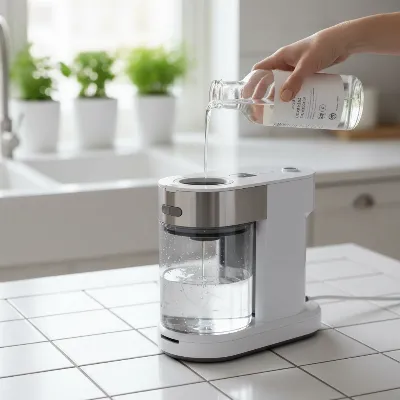 A close-up of a steam cleaner's water tank being descaled with a vinegar solution.
Replacing Worn Parts
Regular inspection helps identify wear and tear early. Components like seals, gaskets, and filters can degrade over time, leading to leaks or reduced performance. If you notice any signs of damage or degradation, such as persistent leaks, unusual noises, or a significant drop in performance even after cleaning, consult your manufacturer’s manual for replacement parts. Prompt replacement prevents small issues from escalating into more serious and costly repairs.
Troubleshooting Common Steam Cleaner Issues
Even with diligent maintenance, issues can occasionally arise. Many common problems can be resolved with simple troubleshooting steps.
-
No Steam Production: This is a frustrating but often fixable problem.
- Check Water Level and Tank Seating: Ensure the water tank is adequately filled and properly seated. Many units have safety mechanisms that prevent operation if the tank is low or incorrectly placed. [cite: 1 (troubleshooting), 3 (troubleshooting), 4 (troubleshooting)]
- Blocked Steam Vents/Nozzles: Mineral deposits are a common culprit. Perform a thorough descaling procedure as outlined above. For severe blockages, multiple descaling cycles may be necessary. [cite: 1 (troubleshooting), 2 (troubleshooting)]
- Clogged Water Intake Filter: Inspect and clean the small filter at the bottom of the water tank if your model has one. [cite: 1 (troubleshooting)]
- Heating Element Failure: If you hear the pump working (a slight clicking sound on pump-fed models) but no heat, the heating element might be faulty. If the machine sounds like a boiling kettle but no steam comes out, limescale might be blocking the system. [cite: 2 (troubleshooting)] Heating element issues often require professional repair or replacement. [cite: 1 (troubleshooting)]
-
Steamer Spits Water Instead of Steam: This usually indicates mineral buildup or a heating issue.
- Descaling: Again, mineral deposits can cause the machine to spit water. Descaling often resolves this. [cite: 1 (troubleshooting)]
- Low Water Level: Some steamers may sputter or produce less steam as the water level gets critically low. Refill the tank. [cite: 1 (troubleshooting)]
- Heating Element Efficiency: An aging or failing heating element might not be reaching the optimal temperature to convert water fully into steam, leading to water droplets. [cite: 1 (troubleshooting)]
-
Reduced Steam Pressure: This is almost always a sign of mineral buildup restricting water flow or steam pathways. Regular descaling and cleaning of nozzles and filters are the primary solutions.
Maximizing the Lifespan of Your Steam Cleaner
Beyond routine and deep cleaning, a few additional practices can ensure your steam cleaner remains a high-performing tool for many years.
Proper Storage: After cleaning and drying, store your steam cleaner in a cool, dry, and dust-free environment. Avoid extreme temperatures, as these can damage internal components. Coiling hoses loosely rather than kinking them also prevents damage. Keep all accessories organized and stored with the machine to prevent loss.
Avoid Overfilling: Always adhere to the maximum fill line indicated on your water tank. Overfilling can lead to leaks, inefficient heating, and potential damage to the machine’s internal workings. [cite: 1, 2, 5 (water type)]
Regular Professional Servicing: While DIY maintenance covers most needs, investing in professional servicing every few years can be beneficial, especially for commercial-grade or higher-end models. Technicians can perform deeper diagnostics, clean hard-to-reach internal components, and replace parts before they cause significant problems, ultimately extending the unit’s operational life.
Follow Manufacturer’s Guidelines: This cannot be stressed enough. Every steam cleaner model is unique, and its manufacturer’s manual contains specific instructions for use, maintenance, and troubleshooting that are tailored to its design. Always refer to your manual for the most accurate and safe practices.
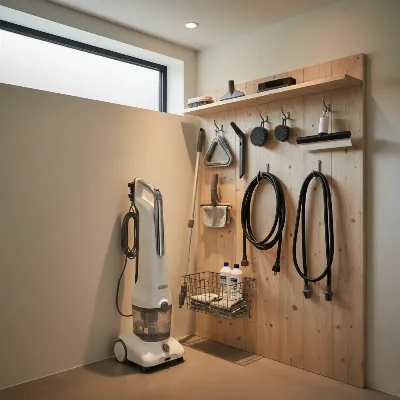 A neatly stored steam cleaner with all its accessories organized beside it.
Conclusion
Maintaining your steam cleaner doesn’t have to be a daunting task. By incorporating simple daily habits, performing periodic deep cleaning like descaling, and addressing issues promptly, you can ensure your appliance continues to provide powerful, chemical-free cleaning for countless sessions. Remember the importance of using the right water, diligently cleaning attachments, and always referring to your specific model’s guidelines. These small efforts translate into significant returns: extended product life, consistent cleaning efficacy, and the continued joy of a hygienically clean home. What essential maintenance tip has made the biggest difference for your steam cleaner?
Frequently Asked Questions
How often should I descale my steam cleaner?
The frequency of descaling depends on your usage and local water hardness. For regular use in areas with moderately hard water, descaling once a month is a good guideline. In very hard water areas or with frequent use, you might need to descale every two weeks. If you consistently use distilled water, descaling can be less frequent. [cite: 2 (descaling), 5 (descaling), 1 (water type)]
Can I use tap water in my steam cleaner?
While many steam cleaners can technically use tap water, it is generally not recommended as tap water contains minerals that lead to limescale buildup. This buildup reduces efficiency and can damage the machine. Using distilled or demineralized water is the best practice for prolonging your steam cleaner’s life and ensuring optimal performance. If you must use tap water, increase your descaling frequency. [cite: 1, 2, 4, 1 (water type), 2 (water type), 4 (water type)]
What should I do if my steam cleaner is spitting water instead of steam?
If your steam cleaner is spitting water, it typically indicates mineral buildup in the system, preventing proper steam generation. The first step should be to perform a thorough descaling. Also, ensure the water tank is adequately filled and check for any blockages in the nozzles. If the problem persists after descaling, it could indicate a weakening heating element.
