The satisfying hiss of a steam cleaner effortlessly sanitizing your home can quickly turn into a frustrating silence when your device suddenly refuses to produce steam. A steam cleaner without steam is, well, just a cleaner. This common household appliance, lauded for its chemical-free deep cleaning power, can sometimes encounter issues that prevent it from performing its primary function. If you’re experiencing this vexing problem, you’re not alone. This comprehensive guide will delve into the most common reasons why your steam cleaner might be failing to generate steam and provide actionable troubleshooting steps to get it back to its steaming best.
Understanding Your Steam Cleaner: The Basics of Steam Generation
Before diving into troubleshooting, it’s helpful to understand the fundamental mechanics of how a steam cleaner operates. At its core, a steam cleaner works by heating water to its boiling point, converting it into high-temperature steam. This steam is then forced out through a nozzle or attachment, effectively lifting dirt, grime, and sanitizing surfaces. The process typically involves a water tank, a heating element, and a mechanism to release the pressurized steam. When any of these components malfunction or are obstructed, the steam production is compromised, leading to a silent, ineffective machine.
Common Reasons Your Steam Cleaner Isn’t Steaming
Diagnosing why your steam cleaner isn’t producing steam often involves a systematic check of several key areas. From power supply to internal blockages, here are the most frequent culprits.
1. Power and Electrical Connections
The most straightforward reason for a lack of steam is often an issue with the power supply. Without adequate power, the heating element simply cannot function.
- Not Plugged In or Loose Connection: Ensure your steam cleaner is firmly plugged into a working electrical outlet. A loose plug can prevent consistent power.
- Faulty Outlet or Power Cord: Test the outlet with another appliance to confirm it’s functional. Inspect your steam cleaner’s power cord for any visible damage, frayed wires, or kinks that could interrupt the electrical flow.
- Blown Fuse or Tripped Breaker: If other appliances on the same circuit are also not working, check your home’s fuse box or circuit breaker panel. A blown fuse or tripped breaker can cut power to the outlet.
- Issue with Power Switch or Controls: Sometimes, the power switch itself or the steam activation trigger can be faulty, preventing the machine from turning on or signaling for steam production.
2. Insufficient Water or Tank Problems
The heating element needs water to convert into steam. Any issue with the water supply to the boiler will stop steam production.
- Low Water Level: This is a surprisingly common oversight. Many steam cleaners have a minimum water level requirement. Check that the water tank is filled above this line. Some models may have a sensor that prevents operation when the water is too low.
- Water Tank Not Properly Seated or Sealed: The water tank must be correctly inserted and sealed for the system to draw water effectively. If it’s askew or the cap isn’t tightened, it can prevent water from reaching the heating chamber.
- Using Additives in the Water Tank: Steam cleaners are designed to work with plain water. Adding cleaning solutions, detergents, or essential oils can cause foaming, clog internal components, or even damage the heating element and void your warranty. Always refer to your manufacturer’s instructions.
- Faulty Water Level Sensor: If your machine thinks it’s out of water even when the tank is full, a faulty sensor might be to blame. This typically requires professional attention.
3. The Culprit: Limescale and Mineral Buildup
By far, the most frequent reason for a steam cleaner to stop producing steam is the accumulation of mineral deposits, particularly limescale, from hard water.
Hard water contains dissolved minerals like calcium and magnesium. When this water is heated repeatedly, these minerals precipitate out and form a hard, chalky residue—limescale. This buildup can clog the heating element, internal pipes, and steam nozzles, restricting or completely blocking the flow of steam. You might hear the machine heating up and sounding like a boiling kettle, but no steam emerges. Regular descaling is crucial for longevity and performance.
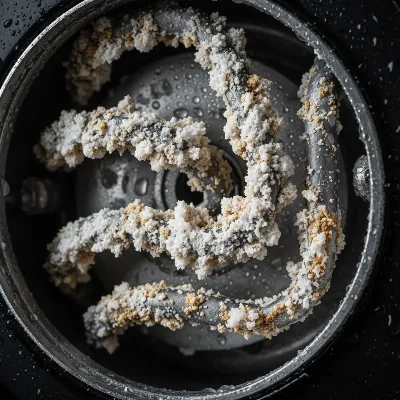 Close-up of limescale buildup inside a steam cleaner's heating element or nozzle, showing white, chalky residue blocking pathways.
4. Malfunctioning Heating Element
The heating element is the heart of your steam cleaner; it’s responsible for bringing the water to a boil. If this component fails, steam production ceases entirely.
- Role of the Heating Element: This component directly heats the water in the boiler. If it’s unable to reach the necessary temperature, no steam will be generated.
- Symptoms of a Failed Element: If your steam cleaner is powered on and has water, but you hear no boiling sound, feel no warmth, and certainly get no steam, a ruptured or burnt-out heating element is a strong possibility. Testing for continuity with a multimeter can confirm this, but it’s a task best left to a professional.
- When Professional Repair Might Be Needed: Replacing a heating element often involves disassembling the unit and dealing with electrical components, which can be dangerous for untrained individuals.
5. Clogged Nozzles and Attachments
Even if the main unit is generating steam, blockages at the point of exit can prevent it from reaching your cleaning surface.
- How Small Particles or Scale Can Block the Output: Limescale isn’t the only culprit; sometimes, small debris or even bits of lint can get lodged in the narrow openings of the steam nozzles or attachments.
- Checking and Clearing Attachments: Detach any accessories like floor nozzles, brushes, or extension wands. Try to run the steam cleaner with just the handle or main unit. If steam comes out, the blockage is in one of your attachments. Use a small pin or a stiff brush to carefully clear any visible debris from the openings. Soaking attachments in a descaling solution can also help.
6. Safety Features at Play
Many modern steam cleaners incorporate safety features to prevent misuse or damage. These can sometimes be mistaken for malfunctions.
- Specific Safety Interlocks: Some steam mops, for example, require the handle to be tilted at a certain angle for steam to be released. If the base cover isn’t correctly attached, certain cleaners may not produce steam. Always consult your user manual for model-specific safety requirements.
- Overheating Protection: If the unit gets too hot, it may temporarily shut down to prevent damage. Allow it to cool down completely before attempting to use it again.
- Thermal Cut-off Issues: A faulty thermal cut-off can prevent the heating element from engaging or staying engaged, leading to no steam output. This often requires a replacement part.
Step-by-Step Troubleshooting Checklist
When your steam cleaner goes silent, follow this practical checklist to diagnose and potentially resolve the issue:
- Check Power: Is the unit properly plugged in? Is the outlet working? Is the power cord undamaged? Check for tripped breakers or blown fuses.
- Verify Water Level: Is there enough water in the tank? Is the tank securely seated and its cap tightened?
- Listen for Sounds: When turned on, does it make a boiling kettle sound? If yes, but no steam, suspect a blockage (limescale, clogged nozzle). If no sound and no warmth, suspect a heating element or electrical issue.
- Inspect Attachments: Remove all attachments. Does steam come out from the main unit? If so, clean the attachments for blockages.
- Perform Descaling (if suspected): If you suspect limescale, proceed to the descaling guide below. This is often the most effective solution for no-steam issues.
Descaling Your Steam Cleaner: A Detailed Guide
Regular descaling is paramount, especially if you live in an area with hard water. It’s often the magic bullet for bringing a “dead” steam cleaner back to life.
- Importance of Regular Descaling: Descaling removes the mineral buildup that clogs internal pathways, ensuring efficient steam production and extending the life of your appliance.
- Methods for Descaling:
- White Vinegar: A common and effective household descaler. Mix equal parts white vinegar and water (a 50/50 solution).
- Commercial Descaler: Many manufacturers offer their own descaling solutions designed specifically for their machines. Follow their instructions carefully.
- Baking Soda: You can also use a mixture of 1.5 ounces of baking soda per quart of distilled water.
- Step-by-Step Instructions for Descaling:
- Safety First: Always unplug your steam cleaner and ensure it is completely cool before starting.
- Empty the Tank: Drain any remaining water from the tank.
- Fill with Solution: Fill the water tank with your chosen descaling solution (e.g., 50/50 vinegar and water).
- Heat and Soak: Turn on the steam cleaner and allow it to heat up. Once hot, let the solution sit in the tank for at least 30 minutes, or up to 1-2 hours for stubborn buildup. For particularly severe cases, some recommend leaving it overnight.
- Release Steam: After soaking, direct the steam nozzle into a sink or bucket and release steam in short bursts until about half of the solution has been used. This helps clear the internal pathways. Repeat this process if needed.
- Rinse Thoroughly: Empty the remaining descaling solution. Fill the tank with fresh, clean water (preferably distilled water) and run the cleaner again until the tank is empty to flush out any residue and residual odor. Repeat rinsing several times.
- Clean Attachments: While descaling the main unit, soak any removable, clogged attachments in the descaling solution as well.
- Tips for Prevention:
- Use Distilled or Filtered Water: This is the most effective way to prevent future limescale buildup, as distilled water contains no minerals.
- Drain After Each Use: Never leave water in the tank after you’re done cleaning. Empty it completely to prevent stagnant water and mineral deposits from forming overnight.
- Regular Descaling: Even with distilled water, occasional descaling (every few months, depending on use) is a good practice.
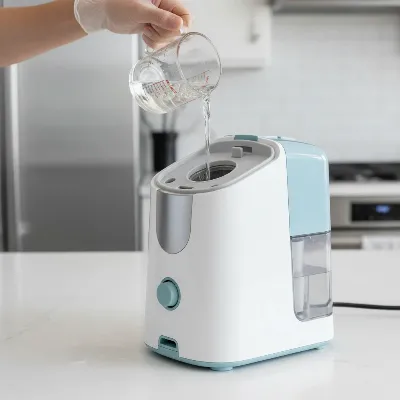 Person pouring descaling solution into a steam cleaner tank to remove mineral buildup and restore steam.
When to Call a Professional
While many common issues can be resolved with DIY troubleshooting, some problems warrant professional intervention.
- Heating Element or Thermostat Malfunction: If you’ve confirmed these components are faulty, their replacement is complex and often requires specialized tools and electrical expertise.
- Persistent Electrical Issues: Any persistent sparking, strange odors, or consistent power failures after checking basic connections should prompt a call to a certified technician.
- Internal Leaks: If your steam cleaner is leaking water from places other than the nozzle, there could be internal seal or pipe damage, which needs professional repair.
- Under Warranty: If your machine is still under warranty, attempting complex repairs yourself might void it. Contact the manufacturer’s customer service first.
Conclusion
A non-steaming steam cleaner can be a nuisance, but with a systematic approach, many issues can be identified and rectified at home. From ensuring a proper power supply and sufficient water levels to the ever-important task of descaling to combat mineral buildup, understanding these common problems empowers you to get your appliance back in working order. Regular maintenance, particularly using distilled water and performing routine descaling, is your best defense against future no-steam dilemmas. Remember, a well-maintained steam cleaner is a powerful ally in keeping your home sparkling clean, chemical-free. What small change will you make today to improve your steam cleaner’s longevity and performance?
Frequently Asked Questions
How often should I descale my steam cleaner?
The frequency depends on how often you use your steam cleaner and the hardness of your water. If you use tap water regularly, descaling every 1-3 months is a good practice. If you use distilled water, you might only need to descale every 6-12 months, or when you notice a decrease in steam output.
Can I use tap water in my steam cleaner?
While most steam cleaners can use tap water, it’s generally recommended to use distilled or demineralized water. Tap water, especially hard water, contains minerals that can lead to limescale buildup, which clogs the machine and reduces its efficiency over time.
What happens if I put cleaning solution in my steam cleaner?
Putting cleaning solutions or detergents into your steam cleaner’s water tank is not recommended. These chemicals can foam excessively, clog the internal mechanisms, cause corrosion, damage the heating element, or even create harmful fumes when heated. Always use plain water unless the manufacturer specifically states otherwise.
How do I know if my heating element is broken?
If your steam cleaner is plugged in, has water, and its power switch is on, but you hear no boiling sounds, feel no warmth from the unit, and receive absolutely no steam, it’s highly probable that the heating element has failed. This usually requires professional repair or replacement.
Why does my steam cleaner make noise but no steam?
If your steam cleaner makes a boiling or humming noise but no steam comes out, it almost always indicates a blockage within the system. This is most commonly due to limescale buildup in the heating element, pipes, or nozzles, preventing the steam from being released. Descaling is usually the solution.
